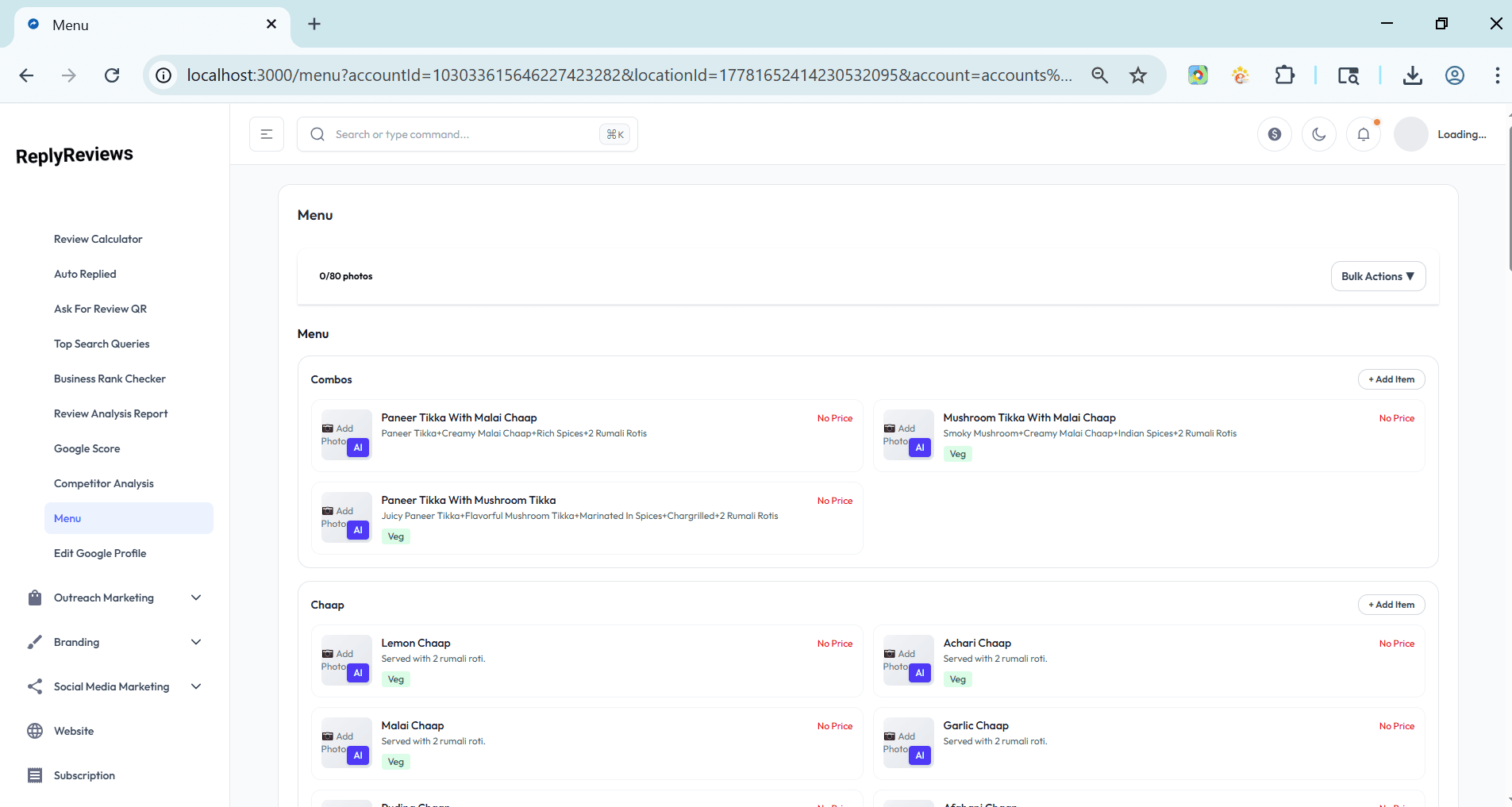
Update Menu on Google Business Profile
in real-time
Add, edit, organize, and sync your menu items, prices, and descriptions directly to Google Business Profile — fast and hassle-free.
Add New Menu Items
Quickly add dishes, drinks, or services with name, price, description, and category.
Bulk Edit & Update
Edit multiple menu items at once and instantly sync changes to your Google Business Profile.
Real-time Sync
Changes made here are reflected on Google Business Profile within seconds.
Menu Management Dashboard
Organize categories, mark items as popular or unavailable, and keep your menu always up-to-date.
Keep your menu fresh on Google
without the hassle
Keep your Google menu current without logging into Google every time.
Add or edit dozens of items in minutes instead of hours.
Customers see accurate prices and availability on Google.
Import from CSV or sync with your existing Menu Card Generator.
Manage your GBP menu
in four simple steps
Connect Google Business Profile
Securely link your GBP to start managing your menu.
Add or Import Menu Items
Manually add items or upload your latest menu via CSV.
Edit & Organize
Update prices, descriptions, mark specials, or set items as unavailable.
Sync to Google
Publish changes instantly to your Google Business Profile menu.